
FAQ - Frequently Asked Questions
How to Enable or Disable Your Mailbox
How to Enable or Disable Your Mailbox
Please note: Enabling or disabling your mailbox only affects messages between users and advertisers. You **cannot** disable messages from the RealEscort system or support team.
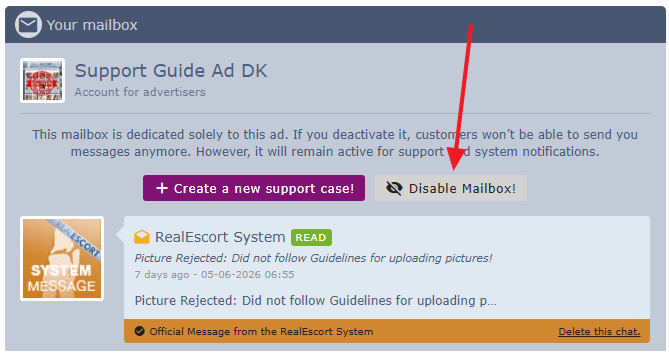
How to Disable Your Mailbox:
- Go to your mailbox and click "Disable Mailbox!" at the top of the page.
How to Enable Your Mailbox:
- First, Read all your unread messages.
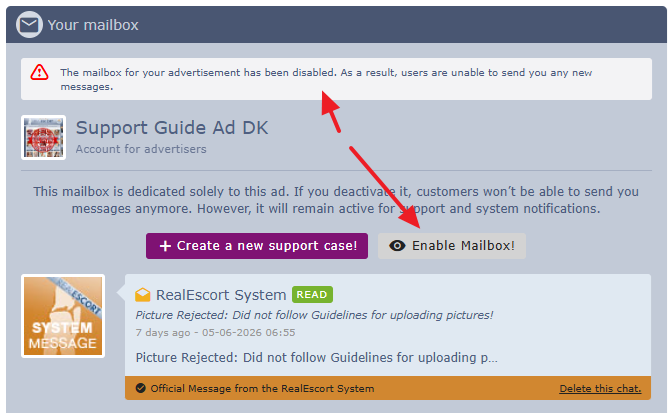
- Then go to your mailbox and click "Enable Mailbox!" at the top of the page.
Important:
If messages from users remain unread for more than 3 days, your mailbox will be **automatically disabled** to prevent users from sending messages that go unanswered.
Please note: Enabling or disabling your mailbox only affects messages between users and advertisers. You **cannot** disable messages from the RealEscort system or support team.
How to Disable Your Mailbox:
- Go to your mailbox and click "Disable Mailbox!" at the top of the page.
How to Enable Your Mailbox:
- First, Read all your unread messages.
- Then go to your mailbox and click "Enable Mailbox!" at the top of the page.
Important:
If messages from users remain unread for more than 3 days, your mailbox will be **automatically disabled** to prevent users from sending messages that go unanswered.